A structured logging framework for Guile Scheme
“Scriba is a structured logging library for GNU Guile that prioritizes flexibility and observability. It provides modular log routing, formatting, and filtering, allowing developers to generate human-readable console logs during development and machine-readable JSON logs for production environments. Key features include an auto-logger configured via environment variables, dynamically scoped log contexts using Scheme parameters, ahead-of-time log level filtering, and minimal runtime overhead achieved through memoization and compile-time macros.”
Find the source code here: https://codeberg.org/jjba23/scriba
A Lisp structured logging library with flexibility, performance and configuration in mind, powered by Guile Scheme.
If you like my work, please support me by buying me a cup of coffee ☕ so I can continue with a lot of motivation.





Why Scriba? #
A primary advantage of Scriba over standard display, write, or println procedures is fine-grained control over log routing, formatting and filtering, with the addition of structured context in logs.
By separating formatting, severity levels, and output destinations, Scriba offers modularity that makes extending the library or writing your own custom loggers trivial.
Scriba is built around the core abstraction of a logger. It achieves high performance by memoizing computations and leveraging compile-time macro expansions.
Find the complete, technical Guile Scheme API documentation here
Available loggers: console , color-console, syslog and json
Observability and Structured Logging #
In modern software development, simply writing (display "\nError happened") is no longer enough. As applications grow in complexity, understanding their internal state in production (observability) becomes critical.
In practice, we see that traditional unstructured logs are nice and easy for humans to read, but notoriously difficult for machines to parse, search, and alert on.
That’s why structured logging is important. In that mindset, we treat logs not as strings of text, but as structured data (typically JSON).
By attaching key-value pairs (context) to your logs, you allow log aggregators (think Grafana Loki, Elasticsearch, or Datadog) to instantly filter and visualize system behavior.
This also makes your life easier when debugging or trying to gain insights into your system.
Scriba gives you the tooling and provides and expressive logger API that can produce beautiful, human-readable logs in development, and robust, machine-readable structured logs in production, without changing a single line of your application code.
Log level is optional in Scriba, as log context can also provide log control.
Quickstart #
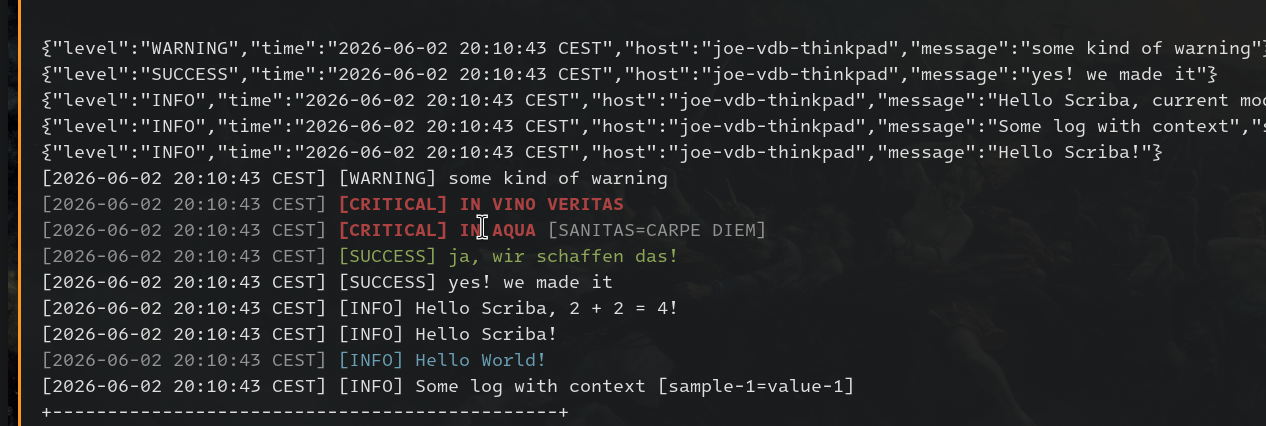
Example logging formats #
Example console logging:
[INFO] [2026-05-24 11:23:06 CEST] Hello Scriba, 2 + 2 = 4!
[INFO] [2026-05-24 11:23:06 CEST] [sample-1=value-1] Some log with context
[2026-06-03 11:56:35 CEST] [#hello #world] Yes! Log with tags! [planet=earth]
Example JSON logging:
{"level":"INFO","time":"2026-05-24 11:23:06 CEST","message":"Some log with context","sample-2":"value-2"}
{"level":"WARNING","time":"2026-05-24 11:23:06 CEST","message":"some kind of warning"}
{"tags":["performance"],"time":"2026-06-03 11:56:35 CEST","host":"joe-vdb-thinkpad","message":"Slept 0 seconds"}
Example syslog logging (RFC 5424):
<14>2 2026-05-29T10:56:49+0200 joe-vdb-thinkpad 37222 - Hello Scriba!
<14>2 2026-05-29T10:56:49+0200 joe-vdb-thinkpad 37222 - [sample-1="value-1"] Some log with context
<12>2 2026-05-29T10:56:49+0200 joe-vdb-thinkpad 37222 - some kind of warning
<14>2 2026-06-03T11:59:18+0200 joe-vdb-thinkpad 80672 - Not gonna sleep! [#performance #benchmark]
The Auto-Configured Logger #
While you can instantiate specific loggers manually, the simplest way to get started is with the auto-logger. It reads environment variables (and, in the future, Scheme configuration files) to automatically determine at runtime which logger to use and how to configure it.
This is especially useful for maintaining different logging behaviors between development and production environments. A common use-case is to use a pretty and colorful console logger in local development, and structured JSON logging in production, for logs to be parsed and aggregated by tools like Loki.
(define-module (my-module)
  #:use-module (scriba auto)
  #:use-module (scriba scriba))

(let* ((s (scriba-auto-logger)))
  (log-info s "Hello Scriba!")
  (with-log-context `((key-1 . value-1))
                    (log-info s "Message with context")))
Note: Logger creation is memoized. Subsequent calls to create the same logger (even elsewhere in your codebase) are instant because the result is only computed once.
Environment Configuration #
The auto-logger checks for SCRIBA_ prefixed environment variables.
| Scriba Env Var | Description | Default |
|---|---|---|
SCRIBA_LOGGER |
The logger backend to use (console , color-console, syslog or json). |
console |
SCRIBA_LOG_LEVEL |
Minimum severity level (e.g., debug, info, error). |
info |
SCRIBA_JSON_PRETTY |
Set to true or 1 to pretty-print JSON logs. |
#f |
SCRIBA_WITH_TIMESTAMP |
Set to true or 1 to include timestamps. |
#t |
SCRIBA_TIMESTAMP_FORMAT |
The strftime format string (e.g., "%F %T %z"). |
"%F %T %Z" |
SCRIBA_OUT_PORT |
The output port to be used (e.g. stdout or stderr or TODO file) |
(current-output-port) |
SCRIBA_FLUSH_PORT |
Set to true or 1 to force port flushing every log action |
#t |
SCRIBA_LOG_LAYOUT |
Comma-separated list of log fields | '(level tags time name message context) |
SCRIBA_TAG_FILTER |
Comma-separated list of tags to filter on (only log if matching) | '() |
SCRIBA_CONTEXT_FILTER |
Comma-separated list of semi-colon separated key value pairs | '() |
Because in its implementation, the get-env-* functions act as defaults for the #:key arguments in %make-scriba-auto-logger, you can easily override the environment programmatically: (scriba-auto-logger #:level 'trace).
Core Concepts #
Each logger supports a shared set of options, albeit possibly with different defaults. Check the implementation of each logger for more accurate details.
Specific Loggers #
Loggers are (optionally named) entities responsible for emitting logs. They act as the primary interface between your application and Scriba. If you prefer to have more control and bypass the auto-logger, you can instantiate specific loggers directly.
See file:src/scriba/ for more details.
All logger implementations share the same fundamental traits and supported functions. Some properties, and default values are specific to certain loggers.
See also the project’s unit tests for more complex configurations: file:test/veritas/unit/log-spec.scm and file:test/veritas/unit/auto-log-spec.scm
Console Logger #
(use-module (scriba scriba)
            (scriba console))

(let* ((s (scriba-console-logger #:name 'console-logger
                                 #:level 'info)))
  (log-info s "1 + 1 = ~a" (+ 1 1))
  (log-message s "This message will always be logged (no level)")
  (log-error s "A critical error occurred"))
Color Console Logger #
(use-module (scriba scriba)
            (scriba color-console))

(let* ((s (scriba-color-console-logger #:level 'info)))
  (log-info s "1 + 1 = ~a" (+ 1 1))
  (log-message s "This message will always be logged (no level)")
  (log-error s "A critical error occurred"))
JSON Logger #
(use-module (scriba scriba)
            (scriba json))

(let* ((s (scriba-json-logger #:name 'json-logger
                              #:level 'info
                              #:pretty? #f)))
  (log-warning s "Something suspicious happened"))
Syslog Logger #
(use-module (scriba scriba)
            (scriba syslog))

(let* ((s (scriba-syslog-logger #:level 'info)))
  (log-info s "2 + 2 = ~a" (+ 2 2))
  (log-warning s "Something suspicious happened"))
Log Levels #
For Scriba, log level is an opt-in concept. Not every system benefits from the same kind of log filtering. Other approaches like tag-based or property-based logging are powerful as well.
So you can e.g. log-info or you can just do log-message if you always want to log.
In the core inner workings of Scriba, we consider log level #t to mean always log, and #f to never log.
A logging action is executed only if its designated level is higher than or equal to the effective level of the configured logger.
A log action of level L issued to a logger having an effective level Q, is enabled if L ≥ Q.
The standard hierarchy is:
trace < debug < info < success < warning < error < critical
Log Context #
For better observability, it is often useful to attach dynamic metadata to your log lines. Scriba handles this seamlessly via contexts:
(with-log-context '((request-id . "req-1234") (user . "alice"))
  (log-info logger "Fetching database records...")
  ;; Any deeper function calls that log will automatically include this context!
  (do-some-work a b c))
You can construct your own logger and filter based on context, with #:context-filter constructor argument, that accepts an alist (the context). Filtering is lenient (can compare symbols, numbers and strings loosely).
(let* ((s (scriba-console-logger #:name 'console-logger
                              #:level 'info
                              ;; filter on context
                              #:context-filter `((some-key . "some-value")))))
  (with-log-context `((some-key . "some-value"))
                 (log-info s "2 + 2 = ~a" (+ 2 2))))
Log Routing #
In general, the most common use-case for programs is to emit log lines to the standard output (stdout). From there you can capture the output and redirect as needed.
Some applications and users may require more advanced functionality like logging to files, sockets, or network destinations.
Scriba offers an easily configurable interface to log destination, thanks to Scheme’s fantastic input/output port system.
By default:
(scriba-console-logger #:out-port (current-output-port)) ;; stdout generally
Logging to a file (TODO how to auto-rolling log files?):
(let* ((file-port (open-output-file "test.log"))
       (s (scriba-console-logger #:out-port file-port)))
  (log-info s "Hello Scriba!")
  (close-output-port file-port)) ;; don't forget to close file ports!
Logging to a string port (in-memory) can be useful to capture logs and test that your program logs as expected:
(let* ((string-port (open-output-string))
      (s (scriba-console-logger #:out-port string-port)))
  (log-info s "Hello Scriba!")
  (let* ((result (get-output-string string-port)))
    (equal? result "\n[INFO] Hello Scriba!"))) ; #t
Log Format #
You can easily customize the log format and disable certain fields via #:layout
(let* ((s (scriba-console-logger #:name 'console-logger
                              #:level 'info
                              #:layout '(level tags time host name context message))))
  (log-info s "2 + 2 = ~a" (+ 2 2)))
Log Tags and tag-based logging #
a.k.a. property-based logging
You can also choose to use log tags to filter upon, and even go for a tag-based / property-based logging approach where your don’t even need log level. Such as every log can have context, every log can also have tags.
[#performance #db] [2026-06-02 21:19:24 CEST] Slept 0 seconds
[2026-06-02 21:21:40 CEST] [INFO] [#hello #world] Yes! [planet=earth]
You can construct your own logger and filter based on tags, with #:tag-filter constructor argument, that accepts a list of symbols (the tags) . Filtering is lenient (can compare symbols, numbers and strings loosely).
Tags can be added (and nested) just like context, with with-log-tags macro.
(let* ((s (scriba-console-logger #:name 'console-logger
                              #:level 'info
                              ;; filter on tags
                              #:tag-filter '(benchmark db performance))))
  (with-log-tags '(benchmark db performance)
                 (log-info s "2 + 2 = ~a" (+ 2 2))))
My Excuses & Good Logging from Day One #
I’m sure you’ve felt this, when starting a new project, setting up a proper logging framework feels like an unnecessary chore.
We reach for (display "\ngot here") or format because it is frictionless.
But as the codebase grows, those scattered print statements become a noisy, unsearchable liability.
With Scriba, you have less excuses to procrastinate:
- “It is too much boilerplate to set up.”
With the
scriba-auto-logger, it takes exactly two lines of code to get a fully functioning, formatted logger. No complex configuration files or initialization rituals required. - “Structured JSON is terrible to read during local development.”
You do not have to look at JSON while developing. Scriba’s auto-logger separates your code from your deployment environment. You can get beautiful, human-readable, even colorful console logs on your machine, and robust, machine-parsable JSON logs in production—just by changing the
SCRIBA_LOGGERenvironment variable. - “I don’t want to pass metadata through 20 function layers.”
Scriba’s
with-log-contextdynamically scopes your data. You can attach arequest-idoruser-idat the top level of your application, and every log statement nested deep within your call stack will automatically include it thanks to Scheme’s parameters andparameterize. - “A logging library will slow down my high-performance prototype.” Thanks to the attention put into performance, Scriba’s overhead is minimal (and worth it). When a log level is disabled (e.g., debug logs in a production environment), the internal I/O and string formatting operations are entirely bypassed.
Start with Scriba on day one ✨
Performance Under the Hood #
Logging is a global cross-cutting concern, and it should never become the bottleneck in your application’s execution.
Scriba achieves high throughput by front-loading as much computation as possible, using the macro system, and leveraging Guile’s native optimizations.
Constructor Memoization #
Creating and configuring loggers can involve reading environments, parsing strings, and allocating records.
Scriba exposes a memoize-logger macro that wraps logger factories with a hash-table cache. If you request a logger with the exact same configuration parameters anywhere in your codebase, Scriba instantly returns the cached instance instead of rebuilding it.
Ahead-of-Time Level Filtering #
Instead of checking the log severity level on every single log-* invocation, Scriba evaluates the hierarchy exactly once when the logger is instantiated.
-Scriba permanently binds that logger’s irrelevant functions to a lightning-fast no-op function when below the level threshold.
- This means calling a disabled log level entirely bypasses string formatting, port flushing, and I/O routing ✨.
Compile-Time Macros #
A great deal of effort is taken to keep runtime overhead strictly minimal, and Scriba avoids doing much dynamic dispatch or runtime reflection.
Some boilerplate operations, such as generating keyword-based record constructors (define-record-with-kw) and generating the domain logging functions (define-logger-method), are handled by Scheme macros that expand natively at compile-time.
Efficient Context Management #
Attaching metadata via with-log-context and with-log-tags does not mutate global state or require expensive thread-locking or mutexes or anything like that.
It relies on Guile’s native parameterize, which securely and efficiently handles dynamically scoped, thread-local variables.
Log tags can be filtered on at runtime, so you can log exclusively lines that contain a tag, also not even needing log levels and allowing more fine-grained control.

Runtime Dependencies #
Scriba has minimal dependencies, requiring only GNU Guile Scheme and a small set of standard libraries. See manifest.scm for full details.
Guile libraries used:
- Guile JSON v4
Testing:
- Veritas test framework for Guile Scheme
Licensing #
scriba and all of its source code are free software, licensed under the GNU Lesser General Public License v3 (or newer at your convenience).
https://www.gnu.org/licenses/lgpl-3.0.html
The documentation and examples, including this document, which are provided with scriba, are all licensed under the GNU Free Documentation License v1.3 (or newer at your convenience).
https://www.gnu.org/licenses/fdl-1.3.html
Installing #
scriba is packaged via the Guix package manager officially, as guile-scriba. It is recommended you use Guix to work on your Guile Scheme projects, and install scriba with it (in your manifest.scm for example). See also the guix.scm
Alternatively, you can modify the package definition to your willing, or install it manually by downloading the source code files and adding them directly to your GUILE_LOAD_PATH or even better, use a Guix shell manifest.scm and add the package with something like this:
(define-public guile-scriba
  (package
    (name "guile-scriba")
    (version "x.x.x")
    (source
     (origin
       (method git-fetch)
       (uri (git-reference
             (url "https://codeberg.org/jjba23/scriba.git")
             (commit (string-append "v" version))))
       (file-name (git-file-name name version))
       (sha256
        (base32 "<dependent on version>"))))
    (build-system guile-build-system)
    (arguments
     (list
      #:source-directory "src"))
    (propagated-inputs (list guile-json-4))
    (inputs (list guile-3.0))
    (synopsis "Structured logging framework for Guile Scheme")
    (description
     "Scriba is a structured logging library for GNU Guile that prioritizes
flexibility and observability.  It provides modular log routing, formatting,
and filtering, allowing developers to generate human-readable console logs
during development and machine-readable JSON logs for production environments.
Key features include an auto-logger configured via environment variables,
dynamically scoped log contexts using Scheme parameters, ahead-of-time log
level filtering, and minimal runtime overhead achieved through memoization
and compile-time macros.")
    (home-page "https://codeberg.org/jjba23/scriba")
    (license license:lgpl3+)))
AI Policy #
This project adheres to the jointhefreeworld AI (Artificial Intelligence) policy.
Our core principle is simple: AI should assist human creativity and problem-solving, never replace human reasoning.
While tools like Large Language Models (LLMs) and interactive chatbots can be beneficial for reviewing, refactoring small functions, or acting as a sounding board, they should be used with moderation.
We require a human in the loop for all contributions. The use of autonomous AI agents to automatically generate and submit pull requests to this project is strictly prohibited.
Code of conduct #
This project adheres to the jointhefreeworld code of conduct. Find it here:
https://jointhefreeworld.org/blog/articles/personal/jointhefreeworld-code-of-conduct/index.html
In summary, we foster an inclusive, respectful, and cooperative environment for all contributors and users of this free software project. Inspired by the ideals of the GNU Project, we strive to uphold freedom, equality, and community as guiding principles. We believe that collaboration in a community of mutual respect is essential to creating excellent free software.
Scriba Project #
Contributing to free software is a uniquely beautiful act because it embodies principles of generosity, collaboration, and empowerment.
We welcome everyone to feel invited to the scriba Project, and encourage active contribution in all forms, to improve it and/or suggest improvements, brainstorm with me, make it more modular/flexible, etc, feel free to contact me <jjbigorra@gmail.com> to chat, discuss or report feedback.
Find here the Backlog and Kanban boards for scriba: https://lucidplan.jointhefreeworld.org/tickets/scriba