The infinitely extensible command runner, control plane and project automator à la Make (Guile Scheme - Lisp)
Find the project at https://codeberg.org/jjba23/maak
Most build tools invent their own limited domain-specific language. Maak embraces the powerful λ Lisp.
This also means your code is solid, reliable and robust for the next 50 years at least.
If you like my work, please support me by buying me a cup of coffee ☕ so I can continue with a lot of motivation.






Core features #
Instead of learning a limited DSL, you can leverage your existing Lisp skills to define tasks, manage data, and automate your workflows with ease. Define functions, manipulate lists, use conditional, create macros—the entire language is at your disposal.
You can also easily call external shell commands and integrate with your existing scripts and tools.
All you will need to do to use Maak is to write a file (by default ./maak.scm) where you define your Maak file module and import Maak library:
(define-module (maak)
  #:declarative? #t
  #:use-module (maak maak))
Defining tasks #
Any function (with or without arguments) you define in this file becomes a runnable task.
Task Export & Visibility Rule #
- Open Fallback (No Exports): If you do not write an
#:exportdirective in your module (or leave it empty), Maak is completely “open season”: all procedures in the file are treated as runnable tasks. - Strict Lock (With Exports): If you define anything in your
#:exportdirective (e.g.,#:export (quick-math)), then only the explicitly exported procedures will be treated as tasks. Any other functions become private helper procedures and are completely hidden from the CLI and--listcommand.
If no task is passed via command-line, Maak will run the default task.
Tasks can:
- Run shell commands with the
$helper. - Print logs with
log-info. - Call other Maak tasks.
- Use any Guile Scheme function you define (or import from a library).
- Some syntactic sugar for working with Guix dev shells and time-machine, e.g.
manifest-shellandprogram-shellas well astime-machine-manifest-shelland more
⚠️ Beware not to use names for tasks that conflict with names of built-in Scheme functions as this can cause some problems. For example, avoid calling something format or display, choose something else instead.
You can extend Maak by defining new tasks — just like writing functions in Scheme.
Here’s an example:
(define (hello)
  "Say hello from Maak!"
  (display "Hello from Maak!")
  (display (format #f "~a + ~a = ~a" 3 4 (+ 3 4))))

(define (quick-math x-arg y-arg)
  ;; beware task args come always as strings due to CLI parse
  (let* ((x (string->number x-arg))
         (y (string->number y-arg)))
    (format #t "~a + ~a = ~a" x y
            (+ x y))))
You can now run it:
maak hello
maak quick-math 23 42
You can also run multiple tasks easily (sequentially) via a comma-separated list :
maak fmt,compile,test
Often it’s just cleaner to do it directly in Lisp (Scheme code ) in your Maakfile (where it’s also trivial to add concurrent computations)
More advanced examples here and below:
;; Format Scheme source code files according to the Guix style guide.
(define (fmt)
  (log-info "Format Scheme files using Guix Style")
  ($ '("find . -maxdepth 8 -name '*.scm'"
       "-type f -exec guix style -f {} \\;")
     #:verbose? #t))

;; Display program help screen.
(define (help)
  ($ '("guix shell -f guix.scm -- maak --help")))

;; By default (no task given) run help.
(define (default)
  ($ '("maak --list"))

;; Do some quick math
(define (arithmetics)
  (fmt) ;; call another task first
  (let* ((entries '(1 3 5 7 9))
         (arithmetics (lambda(x) (* x x 3)))
         (some-data (map arithmetics entries)))
    (log-info "Running default task")
    (log-info "Performed some fun arithmetics:\nResult: ~a" some-data)))
The project logo of maak was generated by the ChatGPT Dall-E LLM when fed this very document
Command Line Interface Options #
Maak provides standard CLI options to manage your execution pipeline:
| Short Flag | Long Flag | Argument | Description |
|---|---|---|---|
-f |
--file |
FILE |
Specify the path to the Maak file (defaults to ./maak.scm). |
-h |
--help |
None | Display the help screen and exit. |
-l |
--list |
None | List all available tasks in the currently loaded Maak file. |
-n |
--dry-run |
None | Dry-run mode. Print shell commands instead of executing them. |
-q |
--quiet |
None | Quiet mode. Suppress standard logging, banners, and header outputs. |
To pass arguments directly to a task, it’s recommended to separate options from tasks with a double-dash (--):
# Run clean and build in dry-run mode, quietly
maak -n -q -- clean,build

# Run a custom task with arguments
maak -f ./my-tasks.scm -- deploy production
Examples of maak files #
Find below a list of some projects using maak for their automation. Reminder: maak.scm is the default name of a maak file, but you can choose to use a different one.
- Heks GNU/Linux - The witches’ GNU/Linux: modular, flexible, reproducible, powered by Lisp and Fedora / Debian + GNOME / Niri
- LucidPlan - Project management (CMS) for everyone - free and open
- Veritas - Unit, Integration and Black Box testing framework powered by Lisp (Guile Scheme)
- Mutastructura - Relational Schema and Database Migrations powered by Lisp (Guile Scheme)
- GGG (Guile Glyph Generator) - Create SVG images, handy useful glyphs, org/markdown badges.
- Hygguile - UI framework for cozy and professional user-interfaces for everyone with the power of Scheme.
- SSS (Supreme Sexp System) - SSS is a Lisp machine adventure, where the hacking culture is celebrated. This custom GNU + Linux setup enhances customization to infinity, encourages the hacking spirit.
Why write Maak ? #
Have you ever found Makefile to be repetitive, lacking expressiveness and having a weird, limited syntax and unexpected arcane behavior?
No fear, Maak is here. With the full power of Lisp directly in your command runner/control plane, easily define functions, data, lists, loop through them, macros, etc. Maak replaces the arcane syntax of Make with the power and elegance of a full-featured functional programming language: GNU Guile Scheme λ.
Maak replaces Make’s runes and mystery with the power and clarity of GNU Guile Scheme λ.
The Problems with Make #
Many developers find GNU Make and related tooling to be at times frustrating and not intuitive, despite being so powerful.
Makefile often contains repetitive code, particularly when dealing with similar targets or file types. You might have to write a separate rule for every single output file, even if the process is exactly the same. The limited syntax makes it difficult to abstract this logic into reusable functions or macros, leading to a lot of copy-pasting.
Make’s syntax is a Domain-Specific Language (DSL), not a general-purpose programming language. While it’s powerful for its intended purpose of managing dependencies, it’s terrible for anything else.
Defining variables, using conditionals, or looping over a list of items can be surprisingly clunky and often requires arcane, non-standard constructs.
Make has many “gotchas” that can trip up even experienced users.
How Maak Innovates #
Maak positions itself as a modern infinitely extensible task runner, using the functional programming language GNU Guile Scheme (a dialect of Lisp). No need for .PHONY recipes here.
Maak gives you the power of Scheme. You’re not restricted to a limited, weird syntax. This means you can easily define functions to avoid repetition, create complex data structures (like lists and maps), and use control flow statements (like loops and conditionals) to write much cleaner and more expressive scripts.
Instead of having to learn a new, limited language, you can leverage your existing Lisp knowledge to define tasks, manage data, and automate your workflows. This leads to code that is much easier to read, write, and maintain. For example, you can write a simple loop to process all your source files instead of writing a separate rule for each one.
Maak is designed to be your central control plane. While Make is primarily focused on building software from source, Maak is a general-purpose command runner. This means you can use it for tasks like running tests, deploying applications, or managing your development environment. It’s meant to be a more flexible and powerful alternative for all your project’s automation needs.
Parameterize: customize the running of tasks and commands #
Dry-run and quietness can be defined globally using the command-line options (-n / -q), but they are also easily controlled and overridden in lexical scope via Lisp (Scheme) parameters.
This gives you a highly precise control mechanism when testing. For example, you can write a test task that dynamically runs destructive file manipulations safely in a localized dry-run scope, without requiring the user to pass a CLI flag.
Dry-runs for example are good for testing.
(define (fmt)
  "Format Scheme source code files according to the Guix style guide."
  (syscall "ls") ;; this will run
  ;; this will not
  (parameterize ((dry-run? #t)
                 (quiet? #f))
    (delete-file-recursively "tmp")
    ($ '("find . -maxdepth 8 -name '*.scm'"
         "-type f -exec guix style -f {} \\;")
       #:verbose? #t)))
;; it will print instead or unning
;; [DRY-RUN]: rm -rfv tmp
;; [DRY-RUN]: find . -maxdepth 8 -name '*.scm' -type f -exec guix style -f {} \;
Help #
The project’s automation is done using Maak itself, check the maak.scm file.
Also, find the technical Guile Scheme API documentation of Maak here:
https://jointhefreeworld.org/api-docs/maak/API.html
You can see the program’s help by invoking ggg with the --help argument or looking at resources/help.txt.
Installing #
maak is officially distributed via:
- Guix package manager
- Podman/Docker images
That being said, feel free to use it as you wish, within the terms of the GNU General Public License v3 or newer.
On Guix #
Maak is Guix-first and caters to Guix as first-class citizen in favor of other package managers or build systems. Maak targets exclusively systems that can run Guile Scheme (and optionally Guix). Check the maak.scm, the guix.scm and manifest.scm for more details.
Requirements:
- Guix: The Guix package manager will ensure a reproducible working software, and will manage all needed dependencies for you.
- Guile Scheme: This entire program is written using the official GNU extension language, Guile Scheme.
If you just want to quickly install it to your profile:
guix package --install-from-file=./guix.scm
For example, to enter an environment shell with maak temporarily you can use:
guix time-machine --channels=channels.scm -- shell -f guix.scm
You can also chain commands to it:
guix time-machine --channels=channels.scm -- \
     shell -f guix.scm -- \
     maak --help
You can also run a dev shell (with manifest)
guix time-machine --channels=channels.scm -- \
     shell -m manifest.scm -- guile -L ./src -c \
     '((@(maak main) main))' --list
Maak is available in upstream Guix as maak in the module (gnu packages build-tools)
On Podman/Docker #
Maak is also available as a Docker container, from DockerHub (also compatible with Podman).
https://hub.docker.com/repository/docker/jjba23/maak/general
You can also build images of maak yourself, using guix pack. See the maak.scm file for more.
To load these tarball images, you can do podman load < my.tar.gz
Then you can run Maak from the container, and bind your local filesystem to give access, for example:
docker container run -v /home/joe:/home/joe \
    docker.io/jjba23/maak:latest \
    maak -f /home/joe/hacking/maak/maak.scm --list
Shell completions: Bash, ZSH, Fish #
Maak offers a simple but powerful shell completion. When you are in a directory with maak.scm files, you can type maak followed by space, then hit TAB and you will see the names of maak tasks appear. This is done by reading the current file and extracting task names from it with some awk magic.
See the scripts at ./scripts . You should “source” these script if you want these completions to be available for you.
You might find these variables useful (for your .bashrc, .zshrc or fish config) specially if you run Guix, but feel free to download and load the scripts from ./scripts at your will in your shell.
For ZSH and fish shell, scripts are also provided, and should be loaded in similar fashion. See ./scripts
ZSH users will want to add the Maak completion script to $FPATH. Fish users will want to look at $fish_complete_path.
Bash example:
maak_bin_install_dir=$(which maak)
maak_install_dir=$(realpath "${maak_bin_install_dir}")
maak_bin=$(dirname "${maak_install_dir}")
maak_store=$(dirname "${maak_bin}")
#!/usr/bin/env bash
maak_completions="${maak_store}/share/scripts/maak-completion.bash"

# Load Maak auto-completions
if [[ -f "${maak_completions}" ]]; then
  source "${maak_completions}" || true
fi
Maak integrations #
Creating a connection to Maak from your favourite programmable environment should be simple.
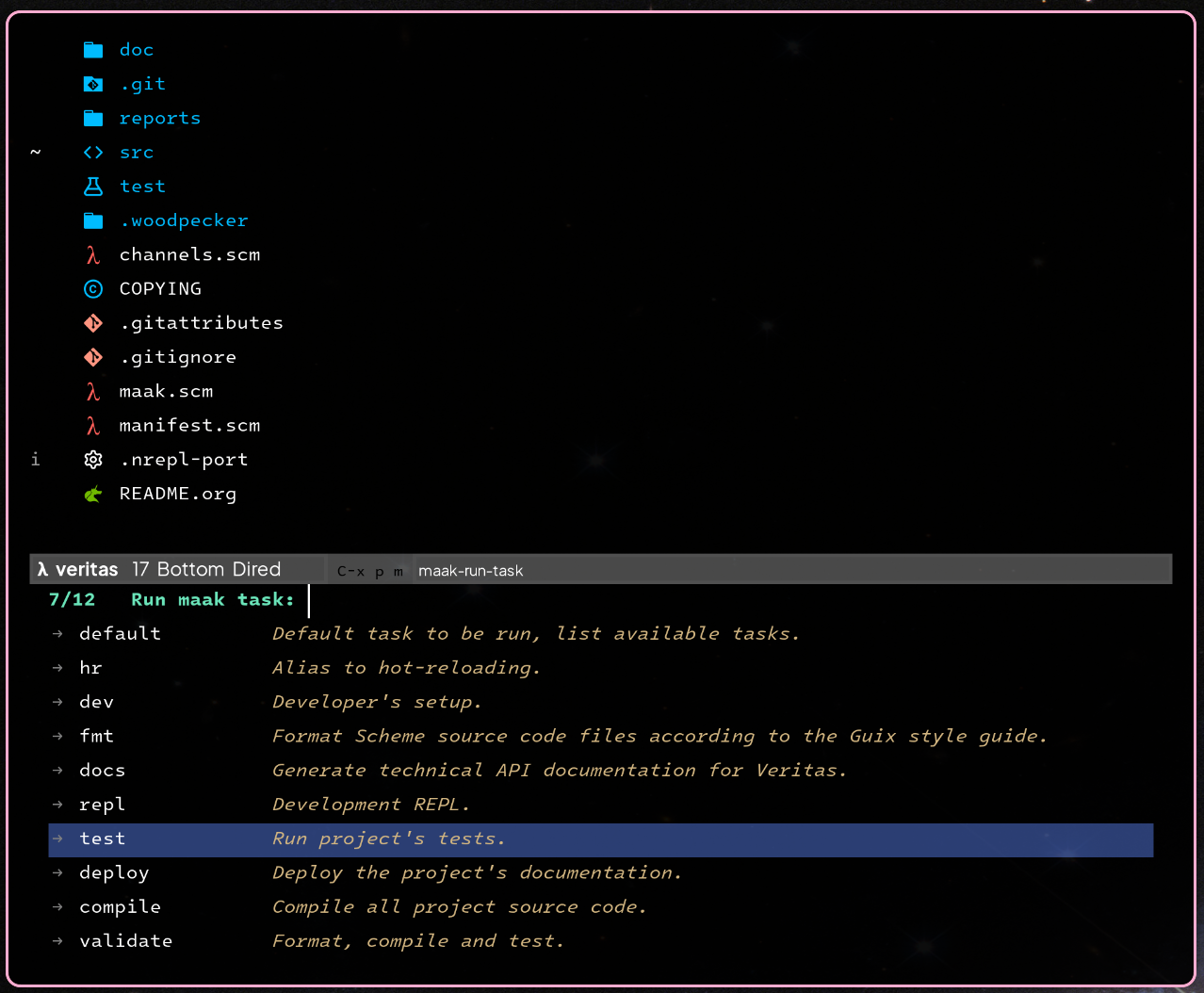
You can see an Emacs integration here: maak.el
Licensing #
Maak and all of its source code are free software, licensed under the GNU General Public License v3 (or newer at your convenience).
https://www.gnu.org/licenses/gpl-3.0.html
The documentation and examples, including this document, which are provided with Maak, are all licensed under the GNU Free Documentation License v1.3 (or newer at your convenience).
https://www.gnu.org/licenses/fdl-1.3.html
REPL: Interactive workflow, developer power #
A REPL (Read-Eval-Print Loop) is an interactive environment, which can be used connected to your console, running application, language compiler and more, which gives you superpowers as an engineer 🦸🏼.
Lisp dialects, more specifically Guile Scheme, have great support for this. I personally of course like to do this with Guix, Emacs, (Arei/Ares + sesman) you can get an ultimate extensible powerful editor experience, miles ahead of traditional IDEs 🐂 .
It fundamentally changes the development workflow by eliminating the slow edit, save, compile, run cycle. Instead of writing a whole program and then running it to see what happens, you get a fast, conversational workflow. What does this mean for in practice?
- Incremental Development: Write, test, inspect, evaluate one function or even one line at a time. Get immediate feedback without running the entire app.
- Powerful Debugging: Forget adding
printstatements and restarting. You can pause, inspect objects, change values, and even redefine a broken function on the fly to test a fix in any environment (yes even in production, while running). - Fast Prototyping & Learning: Instantly experiment with a new library or API. Just load it and start calling functions to see how they work, which is much faster than only reading documentation.
When integrated into your code editor, you can execute any piece of code (a line, a selection, or a file) with a keyboard shortcut and see the result instantly, creating a seamless and powerful development experience.
AI Policy #
This project adheres to the jointhefreeworld AI (Artificial Intelligence) policy.
Our core principle is simple: AI should assist human creativity and problem-solving, never replace human reasoning.
While tools like Large Language Models (LLMs) and interactive chatbots can be beneficial for reviewing, refactoring small functions, or acting as a sounding board, they should be used with moderation.
We require a human in the loop for all contributions.
Code of conduct #
This project adheres to the jointhefreeworld code of conduct. Find it here:
https://jointhefreeworld.org/code-of-conduct/
In summary, we foster an inclusive, respectful, and cooperative environment for all contributors and users of this free software project. Inspired by the ideals of the GNU Project, we strive to uphold freedom, equality, and community as guiding principles. We believe that collaboration in a community of mutual respect is essential to creating excellent free software.
Maak Project #
Contributing to free software is a uniquely beautiful act because it embodies principles of generosity, collaboration, and empowerment.
We welcome everyone to feel invited to the Maak Project, and encourage active contribution in all forms, to improve it and/or suggest improvements, brainstorm with me, make it more modular/flexible, etc, feel free to contact me <jjbigorra@gmail.com> to chat, discuss or report feedback.
Find here the Backlog and Kanban boards for Maak: https://lucidplan.jointhefreeworld.org/tickets/maak
Maak embodies the spirit of GNU: simplicity, freedom, and curiosity. It’s both a tool and a playground for learning Lisp-based automation.
As you grow comfortable, extend Maak — define your own DSLs, orchestrate builds, or automate your projects in elegant Scheme.
Happy hacking! ✨
The Philosophy of Maak #
Maak was designed with a few simple but powerful ideas in mind — ideas rooted in the GNU tradition and Lisp philosophy.
Lisp as the Language of Tasks #
Every build rule, every script, is a first-class Scheme function. This means your automation scripts are composable, readable, and hackable.
Purity and Reproducibility #
Maak believes in pure, deterministic environments, that’s why it integrates so well with GNU Guix 🐂.
Small Is Beautiful #
No YAML, HOCON, INI or configs, no hidden logic, no magic — just clean Scheme code.
Every part of Maak can be read, understood, and extended within a good afternoon of hacking ☕.
Free as in Freedom #
It’s free software under the GNU GPL, built to encourage curiosity, learning, and contribution.
You own your build logic, you can read it, change it, and share it freely.
Hacking on Maak #
In systems where maak is already installed, a good way to compile from source and test all program functionalities is a pure shell:
guix shell --pure -f guix.scm \
     bash coreutils util-linux-with-udev guile -- \
     maak --list

# run project tests
guix time-machine --channels=channels.scm -- \
     shell -f guix.scm --pure -- \
     maak test