I’ve been slowly turning my Emacs config into something I actually enjoy using, not just something that works, and folding was the last place where that wasn’t true.
Every mode had its own idea of what folding is: treesit-fold in Tree-sitter modes, Hideshow in the Lisp-ish ones, Outline in everything that resembles text, Org with its own invisible text that no one else’s commands can undo.
So every buffer had different keys, a different look, and worst of all different performance characteristics. Folding a big file sometimes felt like holding my breath.
I’m running Emacs 32.0.50 from master (built from source, as one does), and it’s finally one system.
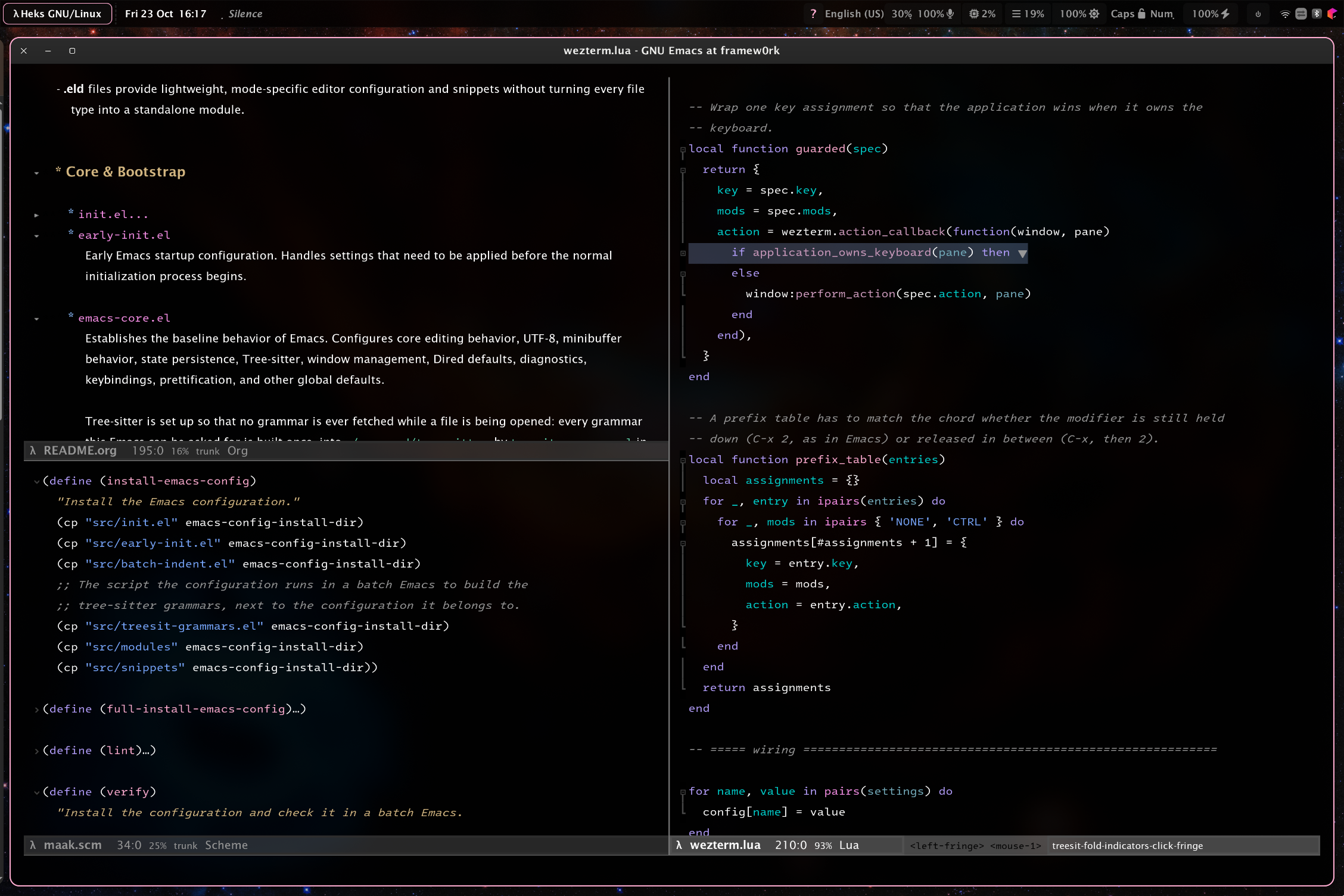
kirigami is the piece I didn’t know I needed #
kirigami doesn’t fold anything itself. It dispatches: it keeps a list of folding engines, checks which one is actually active in the buffer, and forwards to it. Tree-sitter, Hideshow, Outline, Org, Vdiff — all behind one interface.
So on top of it I put one set of keys, the same in a Kotlin buffer, YAML, a Scheme or ELisp buffer and an Org file:
| Key | Does |
|---|---|
C-c v c |
close this fold |
C-c v C |
close every fold |
C-c v o |
open this fold |
C-c v O |
open this fold and everything under it |
C-c v r |
reveal everything |
C-c v t |
toggle the fold at point |
That sounds small. It is not small. The number of times a day I used to think “wait, what does TAB do in this mode again” is now zero, and the muscle memory transfers across an entire polyglot config.
One wrinkle worth mentioning: kirigami answers with the first engine in its list whose mode is on, and outline-minor-mode is on in nearly every buffer I have. In the buffers where I deliberately turned on Hideshow — Scheme, for instance — that choice has to win, otherwise C-c v c folds “headings” a Scheme file doesn’t have. So I reorder kirigami-fold-list to put Hideshow first instead of rewriting it; engines kirigami adds later still get used wherever Hideshow is off.
Tree-sitter folding, with guides that are actually lines #
Most of my programming buffers are *-ts-mode, so treesit-fold does the work there — bash, C, C++, CMake, CSS, Dockerfile, Elixir, Go, HTML, Java, JS/TS/TSX, JSON, Kotlin, Lua, Nix, PHP, Python, Ruby, Rust, Scala, TOML, YAML. Line counts are shown inline, which I find genuinely useful when deciding whether to open a fold.
The indicators took the most fiddling. treesit-fold-indicators draws a block’s guide with a bitmap 23 rows tall, centered in the line beside it. A line in my config is 29 pixels — the font’s 23 plus six of line-spacing — so every row of the guide was a 23-pixel dash with three pixels of nothing above and below it. A folded block looked like a dotted line running down the fringe. Not subtle, just wrong.
There’s no setting for that, so I replaced the bitmaps: a single-row bitmap that define-fringe-bitmap repeats down however tall the line is (no spacing can introduce a gap), plus a +=/-= box and an end-elbow cut to the exact height of a line, so the guide runs from the marker into the row below and turns toward the text where the block ends. It’s an advice on the function that builds the string for each line. It looks like a bracket now, not a perforation.
And the colour: the indicators inherited shadow, which most themes make as bright as a comment. Fine for one marker on one line, wrong for a marker on every line of a block — the grey became a rule drawn through the code. They’re now shadow blended 50% toward the theme’s background, recomputed on every theme and scale change, so it fades correctly on light themes too and no theme needs a special entry.
Hideshow earns its keep #
Not everything has a grammar, and I’m not going to pretend otherwise:
- Scheme — my Emacs build has no Scheme grammar, so Scheme buffers use Hideshow with
hs-block-start-regexpset to"^("andhs-forward-sexp-functionset toforward-sexp. A Scheme file is a sequence of top-level forms, so each definition is a fold, and collapsing the one you’re inside works from anywhere within it. That’s the behaviour I wanted from the start and Hideshow doesn’t guess it by default. - Emacs Lisp — the
prog-modefallback, same keys. - XML — folds from start tag to end tag using
nxml-scan-element-forward, skipping<?xml ?>, comments, DOCTYPE and self-closing elements. - YAML (the non-Tree-sitter mode) — indentation-based blocks with a small
forward-sexpof my own that walks to the end of the indented block.
Hideshow’s own fringe indicators (hs-show-indicators + hs-indicator-type 'fringe) are on in all of these, so it doesn’t feel like a downgrade from the Tree-sitter buffers.
The rule I enforce per buffer is exactly one set of indicators: Tree-sitter buffers get treesit-fold and Hideshow is turned off; Hideshow buffers get Hideshow and Outline’s clickable buttons are turned off so the two don’t double up; outline-only buffers (Markdown, diff) keep the buttons. Nobody ends up with two markers per block.
Org, which needed its own everything #
Org folds with text properties, not overlays, so neither Tree-sitter nor Hideshow nor Outline’s buttons can draw a marker for it. So I wrote its own indicators: a fringe triangle pointing down for an open heading, right for a folded one, clickable with mouse-1 to toggle exactly like TAB. Folding itself is untouched — TAB, S-TAB and the C-c v keys all still work.
The performance part is where the real win is. A naive “redraw indicators after every command” implementation is a disaster in a large file, because it re-searches the buffer and rebuilds every overlay on every pause. Mine is driven by the text instead:
- if
buffer-chars-modified-tickdidn’t change, only the indicators that are on screen are redrawn — off-screen headings can wait until they’re scrolled to; - if it changed and the change was recorded, only the dirty region is rebuilt;
- if it changed with no recorded change, only then is the whole buffer rebuilt.
Folding changes text properties rather than characters, so folding alone takes the cheap path. Fold state is read back from Org on each redraw rather than remembered, so external folding can never leave a stale marker.
Two config choices matter just as much: org-fold-core-style is text-properties (so a visibility cycle doesn’t re-parse the file), org-element-use-cache is on, and Org starts with showeverything — which is both what I want (a note is read, not consulted) and the cheaper state, because it skips the visibility passes that walk every heading on open. I also removed a org-restart-font-lock that was re-fontifying the whole buffer a second time on open; JIT-lock handles what’s on screen.
It feels smooth, and that’s the whole point #
The end result is that folding is boring now. C-c v c in Kotlin, Scheme, Elisp, Org, XML, YAML, Markdown. Guides that look like brackets. Indicators quiet enough to ignore until you need them. No pause on a 3000-line Org file. No two competing markers.
It honestly changes how much I collapse and expand while reading code. I used to avoid folding because it felt fiddly; now it’s free and mouse friendly.
If you want to read the actual code: it’s in dev-folding.el for the engines and indicators, the heks/fold-* wrappers in heks-emacs.el for the keys, and the Org indicators live in org.el. Everything is GPL-3.0, and it’s tested: maak verify asserts a fold actually covers a whole definition and that the documented keys are bound, and maak keys fails on a key that does two jobs or names a command that doesn’t exist.
Happy to answer questions about any of it, especially if you’ve fought the treesit-fold-indicators bitmaps yourself, because that one cost me an evening and I’d love to know if there’s a cleaner way.